


Abode Wireless Smart Security Kit

- Included devices: 1 Smart Security Hub, 1 Mini Door/Window Sensor, 1 Motion Sensor, 1 Keyfob
- Backup: Battery backup; 4G cellular backup requires a subscription
- Smart-home compatibility: Apple HomeKit, Alexa, Google Assistant, Zigbee, and Z-Wave
Ring Alarm Pro
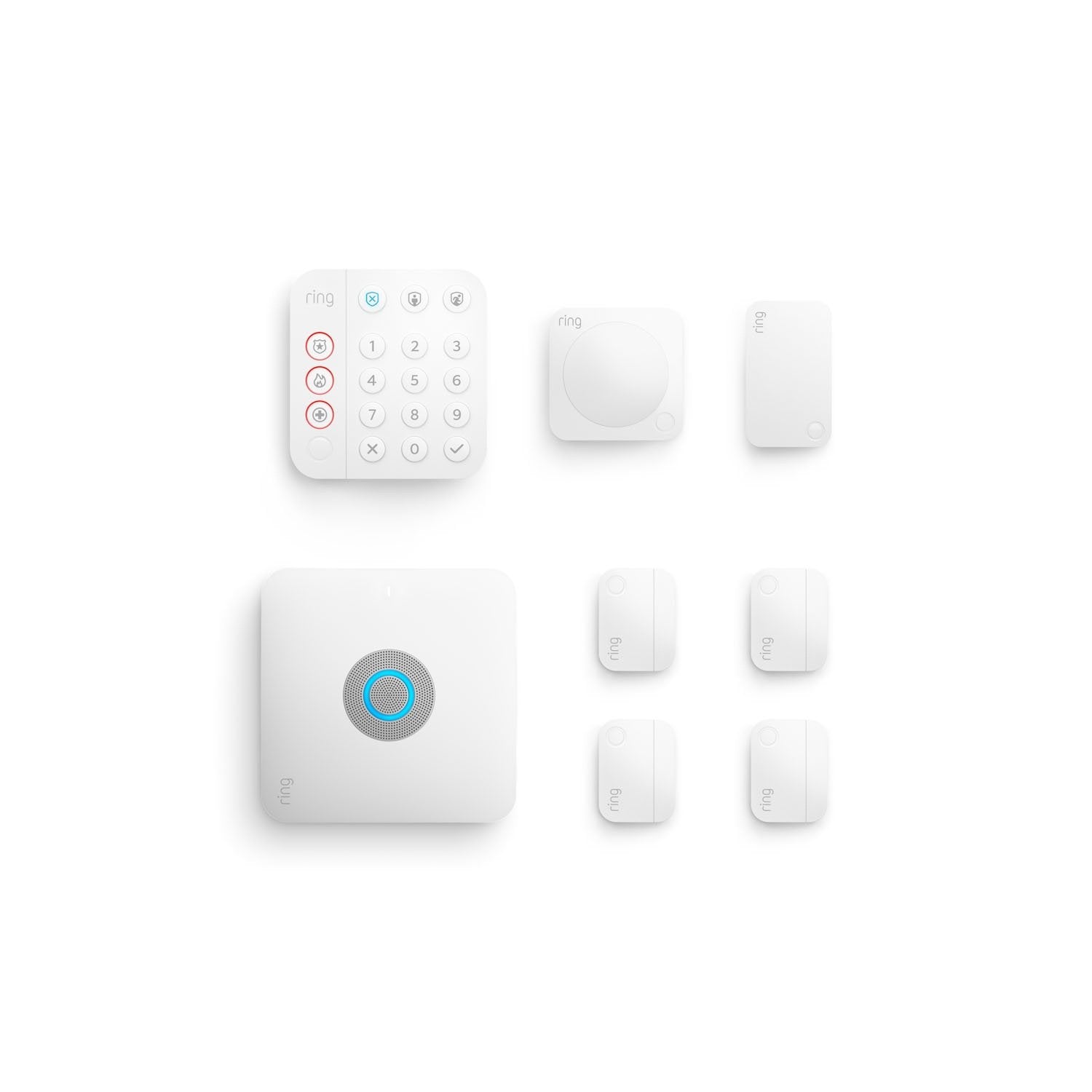
- Built-in router: Built-in eero Wi-Fi 6 router
- Wi-Fi coverage: Up to 1500 Sq. Ft.
- Battery backup: Up to 24 hours in Low Power Mode
Vivint HomeProtect Security System
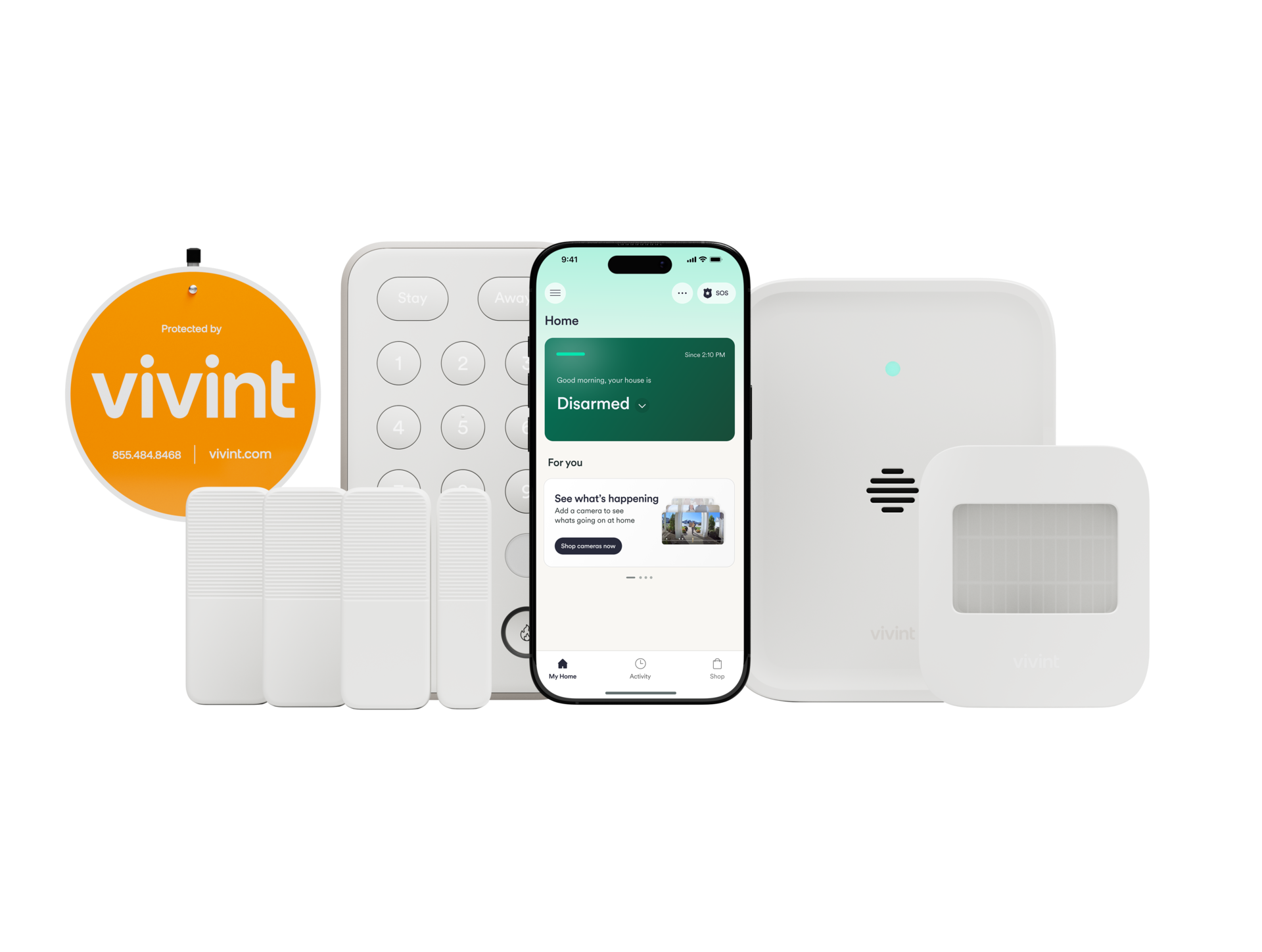
- Security hub: Includes 1 Vivint Security Hub.
- Door and window sensors: Includes 3 Vivint Door & Window Sensors.
- Other included devices: Includes 1 Vivint Motion Sensor, 1 Vivint Keypad, and 1 Vivint yard sign.
The Abode Wireless Smart Security Kit is our best overall pick for its wireless sensors, backup options, and compatibility with several major smart-home platforms. For a security package with three door and window sensors or an alarm system with a built-in Wi-Fi router, consider the Vivint HomeProtect Security System and Ring Alarm Pro.
For the wider category, see recommended home security equipment.
For a related need, compare our best door locks for home.
Another focused comparison is our best home security camera system without subscription.
How do our recommended picks compare?
| Product | Best for | Included devices or documented feature | Distinctive feature | Key feature |
|---|---|---|---|---|
| Abode Wireless Smart Security Kit | Wireless setup with smart-home compatibility | Hub, mini door/window sensor, motion sensor, keyfob | Battery backup; 4G cellular backup requires a subscription | Smart-home compatibility: Apple HomeKit, Alexa, Google Assistant, Zigbee, and Z-Wave |
| Vivint HomeProtect Security System | A package with several entry sensors and a keypad | Hub, 3 door/window sensors, motion sensor, keypad, yard sign | Three door and window sensors | Other included devices: Includes 1 Vivint Motion Sensor, 1 Vivint Keypad, and 1 Vivint yard sign. |
| Ring Alarm Pro | An alarm system with a built-in router | Built-in eero Wi-Fi 6 router | Internal battery backup: up to 24 hours in Low Power Mode | Battery backup: Up to 24 hours in Low Power Mode |
Which wireless home security system options should you compare?
1. Abode Wireless Smart Security Kit Best Overall
The Abode Wireless Smart Security Kit is our best overall choice for a shopper seeking a wireless alarm foundation. Its listed kit includes a hub, a mini door and window sensor, a motion sensor, and a keyfob, while the hub offers battery backup and subscription-dependent 4G cellular backup. The kit also supports Apple HomeKit, Alexa, Google Assistant, Zigbee, and Z-Wave, making it a natural fit for households that want security to work alongside smart-home devices. The hub connects directly to an internet router, so check that connection arrangement against your setup.
Best for Households looking for a wireless security starter kit with broad smart-home compatibility and backup options.
| Included devices | 1 Smart Security Hub, 1 Mini Door/Window Sensor, 1 Motion Sensor, 1 Keyfob |
|---|---|
| Backup | Battery backup; 4G cellular backup requires a subscription |
| Smart-home compatibility | Apple HomeKit, Alexa, Google Assistant, Zigbee, and Z-Wave |
Pros
- Includes a hub, entry sensor, motion sensor, and keyfob.
- Has battery backup and offers 4G cellular backup with a subscription.
- Works with Apple HomeKit, Alexa, Google Assistant, Zigbee, and Z-Wave.
Cons
- The hub connects directly to an internet router.
- Additional devices may be needed to cover more entry points or rooms.
Buy if You want a kit with entry and motion sensors, battery backup, and the option of 4G cellular backup with a subscription. Search Amazon by this exact product name to check for listings.
Skip if You need a hub that connects over Wi-Fi rather than directly to your internet router, or you prefer professional installation.
Sources: Product source
2. Vivint HomeProtect Security System
The Vivint HomeProtect Security System offers a package with a security hub, three door and window sensors, a motion sensor, a keypad, and a yard sign. That mix may suit shoppers who want several entry sensors and a keypad in the listed package. Compare its included devices with the areas you want to cover when deciding whether it fits your home.
Best for Shoppers who want a package with several entry sensors and a keypad.
| Security hub | Includes 1 Vivint Security Hub. |
|---|---|
| Door and window sensors | Includes 3 Vivint Door & Window Sensors. |
| Other included devices | Includes 1 Vivint Motion Sensor, 1 Vivint Keypad, and 1 Vivint yard sign. |
Pros
- The listed package includes three door and window sensors.
- Includes a motion sensor and keypad.
- Includes a yard sign in the listed package.
Cons
- The listed package may not include enough sensors for every home’s coverage needs.
- The listed package’s included devices may not match every household’s needs.
Buy if You want a package with three door and window sensors, a motion sensor, and a keypad. Search Amazon by this exact product name to check for listings.
Skip if You are looking for a package with a different mix of included devices.
Sources: Product source
3. Ring Alarm Pro Alternative Pick
Ring Alarm Pro is an alternative for shoppers who want an alarm system with a built-in router. It combines whole-home protection with an eero Wi-Fi 6 router and supports 75+ connected devices. Stated Wi-Fi coverage is up to 1,500 square feet, with additional eero extenders available for larger coverage needs. The internal battery backup can last up to 24 hours in Low Power Mode. This combination may suit someone considering both home networking and security.
Best for Households interested in combining an alarm system with a built-in eero Wi-Fi 6 router.
| Built-in router | Built-in eero Wi-Fi 6 router |
|---|---|
| Wi-Fi coverage | Up to 1500 Sq. Ft. |
| Battery backup | Up to 24 hours in Low Power Mode |
Pros
- Combines security with a built-in eero Wi-Fi 6 router.
- Supports 75+ connected devices.
- Has an internal battery backup with a stated Low Power Mode duration.
Cons
- The stated Wi-Fi coverage may not suit every home’s layout.
- Additional eero extenders may be needed for coverage beyond the stated area.
Buy if You want a system with an integrated router, stated Wi-Fi coverage, and backup features. Search Amazon by this exact product name to check for listings.
Skip if You do not want an alarm system that also serves as a Wi-Fi router.
Sources: Product source
How did we choose these recommendations?
- Compared each system’s listed devices, connectivity, backup features, and smart-home compatibility.
- Considered how each system’s listed features may suit different household needs, including sensor coverage and whether an alarm system should also serve a network role.
- Matched each recommendation to a defined use case rather than treating one system as the right choice for every household.
We researched and compared published product specifications, documented features, and the sources linked beside each pick.
What should you look for when choosing wireless home security system?
Map doors, windows, and rooms before choosing
Write down the entry points you want to monitor and the rooms where motion detection matters. Then compare that list with the package contents. Abode’s listed starter kit includes one entry sensor and one motion sensor; Vivint’s listed package includes three door and window sensors and one motion sensor. Those different starting points can guide whether you need to plan for additional devices. Check the product configuration for exact included equipment before purchase.
Check how the hub connects
A wireless sensor setup does not necessarily mean the hub itself connects over Wi-Fi. Abode’s hub connects directly to an internet router, while its sensors connect wirelessly to the hub. Ring Alarm Pro includes a built-in eero Wi-Fi 6 router, giving it a separate network role. Consider where your router or modem is located and whether you want your alarm base station to take on a networking function.
Decide which backup features matter
Compare the specific backup options rather than treating them as interchangeable. Abode lists battery backup and 4G cellular backup, which requires a subscription. Ring Alarm Pro lists an internal battery backup with up to 24 hours in Low Power Mode. Check the product details for the backup functions available in the system you are considering.
Match compatibility to devices you already use
If you have a preferred smart-home platform, check whether the security system supports it and whether the individual devices you want to connect are compatible. Abode lists Apple HomeKit, Alexa, Google Assistant, Zigbee, and Z-Wave support. Ring Alarm Pro’s defined distinction is its built-in eero Wi-Fi 6 router. Choose based on the integrations you plan to use, not a broad assumption that every smart device will work with every system.
Choose the setup experience that suits you
Consider the setup process that suits you and confirm the requirements for the system you plan to buy. Abode’s sensors connect wirelessly to its central hub, which connects directly to an internet router. Vivint’s listed package includes a hub, sensors, a keypad, and a yard sign. Ring Alarm Pro also serves as a Wi-Fi router, so consider its place in your home network.
The Abode Wireless Smart Security Kit brings together entry and motion sensors, a keyfob, and a hub with battery and cellular backup. Its support for several smart-home platforms may suit shoppers who want a security system to interact with compatible devices they already use. The hub connects directly to an internet router.
The Vivint HomeProtect Security System’s listed package includes three door and window sensors, a motion sensor, and a keypad. Ring Alarm Pro addresses a different need: it combines security with a built-in eero Wi-Fi 6 router. The best match depends less on a universal ranking and more on which practical priority matters in your home: included sensor coverage, smart-home compatibility, or an integrated network device.
Start with the devices that come with the package, then consider where you need coverage. Abode lists one hub, one mini door and window sensor, one motion sensor, and one keyfob. That is a clear starter combination, but a household with multiple doors or rooms may want to consider additional devices.
Vivint’s listed package includes one hub, three door and window sensors, one motion sensor, one keypad, and one yard sign. That gives shoppers a different included-device mix, particularly if several entry points are a priority. Ring Alarm Pro combines whole-home protection with a built-in eero Wi-Fi 6 router. Its stated coverage is up to 1,500 square feet, and it supports 75+ connected devices. Compare the features that matter for your home with the package you plan to order.
FAQ
Which pick is best overall?
The Abode Wireless Smart Security Kit is our best overall pick because its listed package includes a hub, entry sensor, motion sensor, and keyfob, with battery backup and subscription-dependent cellular backup. It also supports several named smart-home platforms. Its hub connects directly to an internet router, which is worth checking against your setup preference.
What devices are included in the Vivint HomeProtect package?
The Vivint HomeProtect Security System’s listed package includes a security hub, three door and window sensors, a motion sensor, a keypad, and a yard sign.
Does Abode work with Apple HomeKit?
Yes. The Abode Wireless Smart Security Kit lists Apple HomeKit compatibility, along with Alexa, Google Assistant, Zigbee, and Z-Wave. If you plan to connect other devices, verify that each particular device is compatible with the system and the platform you intend to use.
Does Ring Alarm Pro include a Wi-Fi router?
Yes. Ring Alarm Pro includes a built-in eero Wi-Fi 6 router. Its stated coverage is up to 1,500 square feet, and additional eero extenders can expand coverage. Coverage and network performance can depend on the home and its setup, so consider your layout before relying on the stated coverage.
Does Ring Alarm Pro have backup during an outage?
It has an internal battery backup described as lasting up to 24 hours in Low Power Mode. Check the product details for the functions available in that mode.
What should I check before buying a wireless alarm system?
Compare the included sensors with the doors, windows, and rooms you want to cover. Check how the hub connects, whether the system works with your smart-home platform, and what backup features are included or subscription-dependent. Also decide whether you want a DIY setup or professional installation, then confirm the equipment in the specific package you plan to order.
Which wireless home security system should you buy?
For most homes, start with the Abode Wireless Smart Security Kit. For another option, compare the Ring Alarm Pro. Need the use-case pick? Consider the Abode Wireless Smart Security Kit.
- Best Overall: Abode Wireless Smart Security Kit
- Alternative Pick: Ring Alarm Pro
- Pick 3: Vivint HomeProtect Security System
When was this guide last updated?
- November 07, 2026: Editorial research prepared. Product specifications and source images reviewed.