


Brother P-touch PT-N25BT
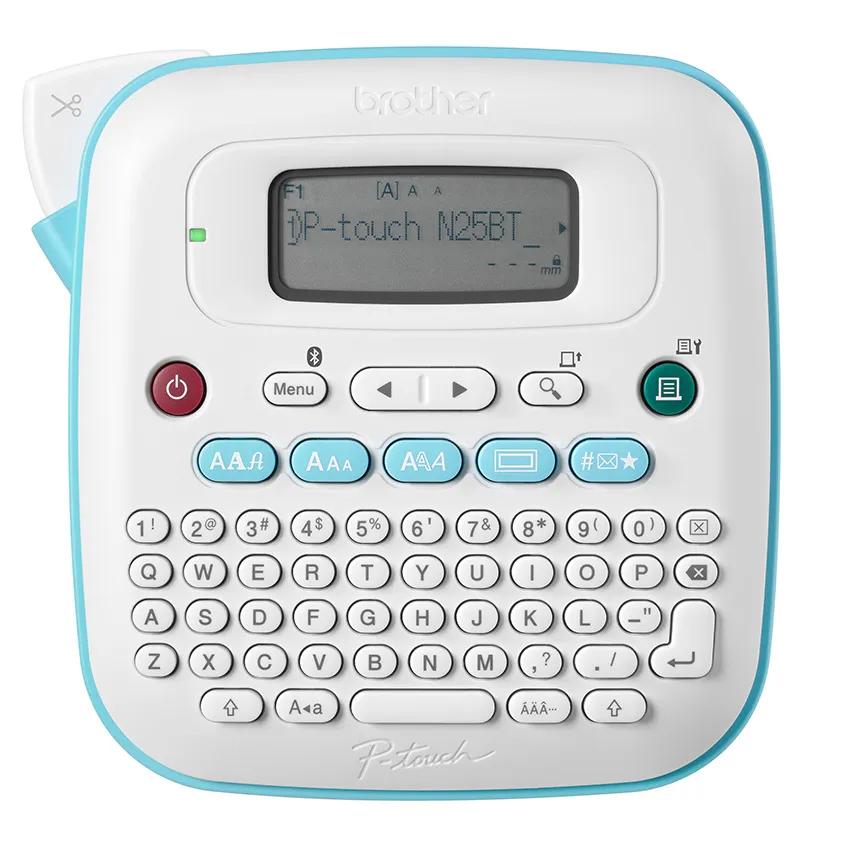
- Tape compatibility: Brother Btag tapes, 12 mm wide
- Display: 16 characters × 1 line
- Power: 6 AAA batteries, not included, or AC adapter, not included
DYMO LabelManager 160
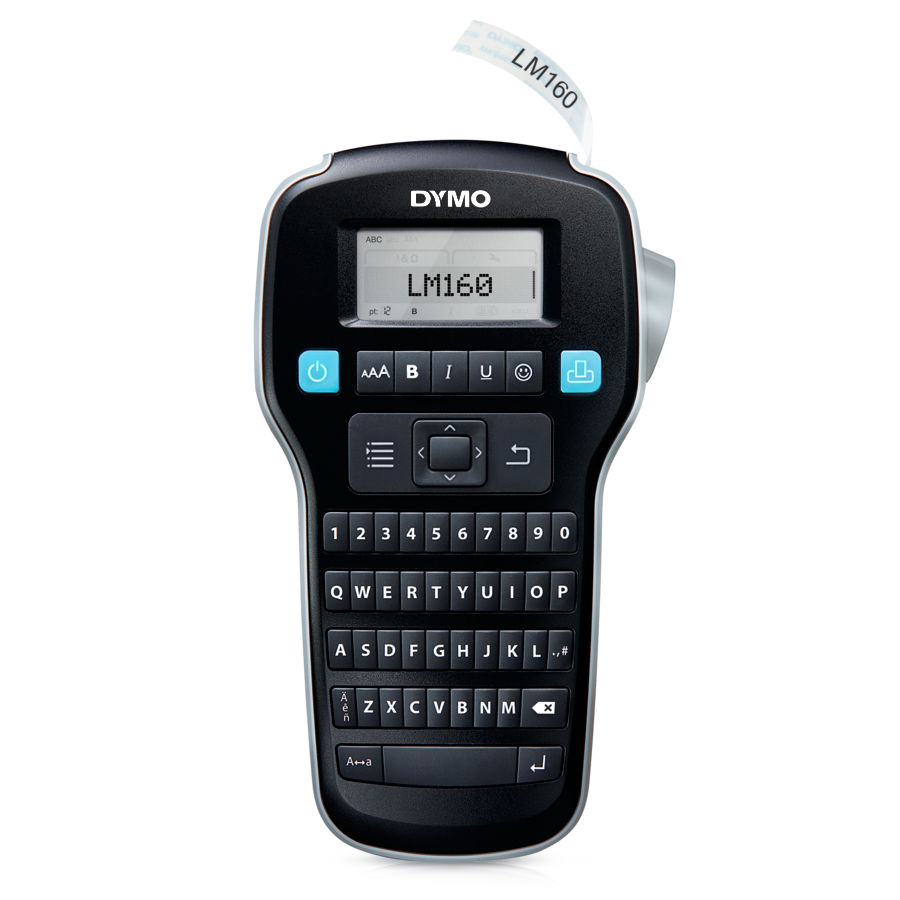
- Label compatibility: LabelManager D1 Standard and Durable Tapes
- Dimensions: 10.437 × 6.312 × 2.625 inches
- Color: Black
Brother P-Touch PT-D220 Label Maker
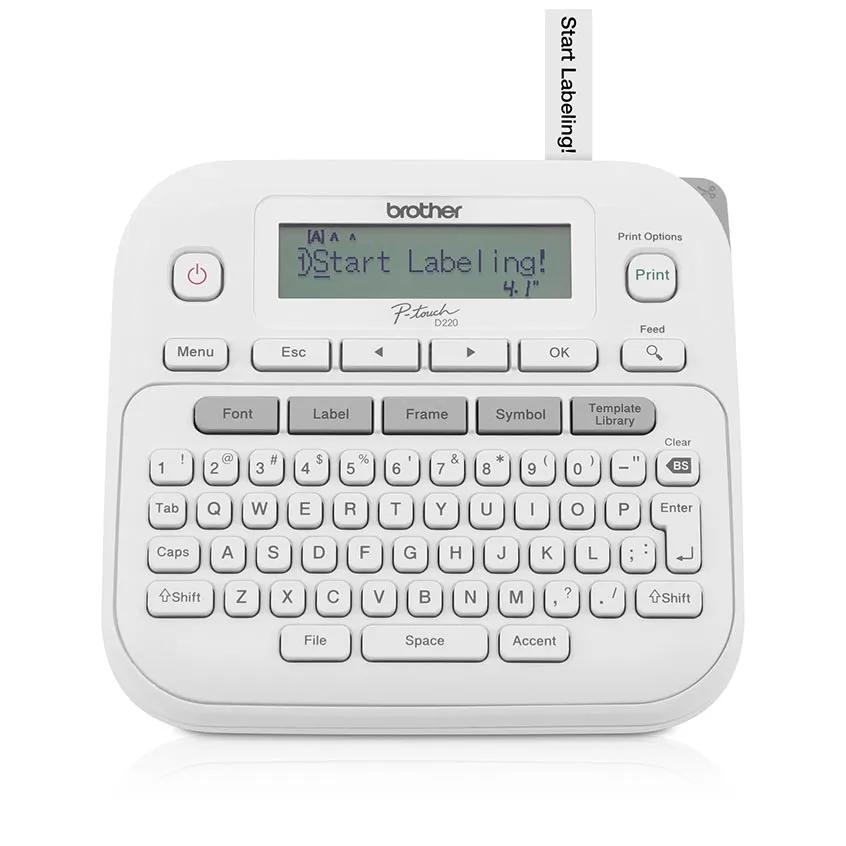
- Maximum label width: 12 mm
- Fonts, styles, and frames: 14 fonts, 11 font styles, and 99 frames
- Power: 6 AAA batteries or optional AC adapter; both not included
The Brother P-touch PT-N25BT is the best overall home label maker for shoppers who want phone-based design options alongside a built-in keyboard. Its Bluetooth connection, access to the Brother Design&Print 2 app, and ability to store up to 10 labels make it a flexible choice for recurring household projects.
For the wider category, see the full home office equipment comparison.
For a related need, compare our best webcam for working from home.
How do our recommended picks compare?
| Product | Best for | Tape compatibility or label-width detail | Keyboard or other listed detail | Display or other listed detail |
|---|---|---|---|---|
| Brother P-touch PT-N25BT | App-assisted design and reusable layouts | Brother Btag tapes, 12 mm wide | Enlarged QWERTY keyboard; Bluetooth app access | 16 characters × 1 line |
| Brother P-Touch PT-D220 Label Maker | On-device formatting and preset templates | Maximum label width 12 mm | Full QWERTY keyboard | 15-character display |
| DYMO LabelManager 160 | LabelManager D1 tape compatibility | LabelManager D1 Standard and Durable Tapes | Black | 10.437 × 6.312 × 2.625 inches |
Which home label maker options should you compare?
1. Brother P-touch PT-N25BT Best Overall
The Brother P-touch PT-N25BT is our best overall pick for home users who want both direct keyboard entry and phone-based label design. Bluetooth connects it to the Brother Design&Print 2 app, while the enlarged QWERTY keyboard offers a separate way to enter text. It works exclusively with Brother Btag tapes in 12 mm width, has a 16-character, one-line display, and can store up to 10 labels for reuse. Its 250 built-in symbols (1,365 with the app) add options for personalized projects. The main tradeoff is tape choice: it works exclusively with Btag tapes. Its power options are six AAA batteries or an AC adapter, neither included, so plan for the power source that suits your workspace.
Best for Households that want app-assisted customization and reusable label layouts.
| Tape compatibility | Brother Btag tapes, 12 mm wide |
|---|---|
| Display | 16 characters × 1 line |
| Power | 6 AAA batteries, not included, or AC adapter, not included |
Pros
- Bluetooth connectivity with access to the Brother Design&Print 2 app.
- Stores up to 10 labels for reuse.
- Enlarged QWERTY keyboard and a 16-character, one-line display.
Cons
- Works exclusively with Brother Btag tapes.
- Batteries and AC adapter are not included.
Buy if You want Bluetooth app access as well as an enlarged QWERTY keyboard.
Skip if You need a label maker that accepts tape outside the Brother Btag family.
Sources: Product source
2. Brother P-Touch PT-D220 Label Maker
The Brother P-Touch PT-D220 Label Maker is a good fit for shoppers who prefer an on-device keyboard and want several built-in formatting choices. Its full QWERTY keyboard and 25 preset templates provide a starting point for common label-making tasks. The 15-character display and maximum label width of 12 mm are useful specifications to consider when planning labels. It offers 14 fonts, 11 font styles, and 99 frames. Check tape compatibility for the specific supplies you plan to use. It uses six AAA batteries or an optional AC adapter; neither is included.
Best for Home organization tasks where direct keyboard controls and preset templates are useful.
| Maximum label width | 12 mm |
|---|---|
| Fonts, styles, and frames | 14 fonts, 11 font styles, and 99 frames |
| Power | 6 AAA batteries or optional AC adapter; both not included |
Pros
- Full QWERTY keyboard.
- Includes 25 preset label templates.
- Offers 14 fonts, 11 font styles, and 99 frames.
Cons
- Does not include an AC adapter or AAA batteries.
- The documented maximum label width is 12 mm.
Buy if You want a full QWERTY keyboard and preset templates.
Skip if You need labels wider than 12 mm.
Sources: Product source
3. DYMO LabelManager 160 Alternative Pick
The DYMO LabelManager 160 is an alternative for shoppers whose existing labeling supplies are LabelManager D1 tapes. Its listed compatibility includes LabelManager D1 Standard and Durable Tapes. The product is black, and its published dimensions are 10.437 × 6.312 × 2.625 inches. Those details can help shoppers match their tape supplies and plan where to store the label maker.
Best for Shoppers who want compatibility with LabelManager D1 Standard and Durable Tapes.
| Label compatibility | LabelManager D1 Standard and Durable Tapes |
|---|---|
| Dimensions | 10.437 × 6.312 × 2.625 inches |
| Color | Black |
Pros
- Compatible with LabelManager D1 Standard and Durable Tapes.
- Published dimensions are available for planning storage.
- A distinct alternative to the Brother tape systems.
Cons
- Check that LabelManager D1 Standard or Durable Tapes match the supplies you want to use.
Buy if You already use, or specifically want to use, LabelManager D1 Standard or Durable Tapes.
Skip if You need to use a tape family other than LabelManager D1 Standard or Durable Tapes.
Sources: Product source Additional specifications
How did we choose these recommendations?
- Compared published specifications and documented features relevant to home organization, including keyboard controls, display information, and available design options.
- Considered tape compatibility as a practical ownership factor, since each model works with a particular tape family or format.
- Compared the listed power options for the Brother models so shoppers can account for batteries or an optional adapter.
- Matched each recommendation to a defined use case rather than treating one model as the right choice for every household.
We researched and compared published product specifications, documented features, and the sources linked beside each pick.
What should you look for when choosing home label maker?
Match the tape family before anything else
Tape compatibility is an important practical consideration. The PT-N25BT works exclusively with Brother Btag tapes; the PT-D220 supports labels up to 12 mm wide; and the DYMO is listed for LabelManager D1 Standard and Durable Tapes. Existing supplies can make one system a natural fit. If you are buying tape and a label maker together, decide which family you want to use and verify compatibility before ordering.
Choose how you want to enter text
If typing on the label maker is important, both Brother options have QWERTY keyboards. The PT-N25BT adds Bluetooth access to the Brother Design&Print 2 app, while the PT-D220 offers preset templates and built-in formatting choices including fonts, styles, and frames. Choose based on the workflow you expect to use regularly. The DYMO LabelManager 160 is an option to consider if LabelManager D1 tape compatibility suits your supplies.
Decide how much customization you need
For app-based design, the PT-N25BT provides access to the Brother Design&Print 2 app and offers 250 built-in symbols (1,365 with the app). The PT-D220 offers a different kind of flexibility through 14 fonts, 11 font styles, 99 frames, and 25 preset templates. The DYMO LabelManager 160 is a distinct option for shoppers whose tape supplies are LabelManager D1 Standard or Durable Tapes.
Look at the display and preview features
The Brother display specifications offer a basis for comparing the models: the PT-N25BT has a 16-character, one-line display, and the PT-D220 has a 15-character display. Consider those display sizes alongside the other verified features when choosing.
Plan for power and storage
Both Brother models list six AAA batteries or an optional AC adapter, and neither power option is included. Plan how you want to power the device before starting a project. The DYMO’s published dimensions can help you judge storage fit. Consider where you will keep the label maker and whether you prefer to work near an outlet or use batteries, based on the options listed for the Brother model you select.
Which home label maker is the best overall?
The Brother P-touch PT-N25BT is a strong fit in this comparison for shoppers who want options for how they create labels. You can type with its enlarged QWERTY keyboard or connect by Bluetooth to the Brother Design&Print 2 app. The model has 250 built-in symbols, with 1,365 available with the app.
Practical details matter for repeat projects: the PT-N25BT has a 16-character, one-line display and can store up to 10 labels. Those features make it a useful match for recurring household labels or projects where personalization is part of the goal. Its main constraint is tape compatibility. The PT-N25BT works exclusively with Brother Btag tapes in 12 mm width, so choose it only if that tape system works for you.
Which model is best for on-device label making?
The Brother P-Touch PT-D220 Label Maker makes sense if you want to type and choose built-in options on the machine itself. Its full QWERTY keyboard and 25 preset templates provide a starting point for common label projects. The 15-character display is another specification to consider when choosing a model.
The PT-D220 is a good choice for shoppers who want a range of built-in text treatments. It has 14 fonts, 11 font styles, and 99 frames, and supports labels up to 12 mm wide. Check compatibility with the specific tape you plan to use. Its power options are six AAA batteries or an optional AC adapter, both not included.
FAQ
What is the best home label maker in this guide?
The Brother P-touch PT-N25BT is the best overall pick for shoppers who want an enlarged keyboard and Bluetooth access to the Brother Design&Print 2 app. It has a 16-character, one-line display and stores up to 10 labels. Its exclusive compatibility with Brother Btag tapes is an important consideration before buying.
Which label maker is best if I do not want to rely on an app?
The Brother P-Touch PT-D220 Label Maker is a fit for shoppers who want on-device label-making controls. It has a full QWERTY keyboard, 25 preset templates, 14 fonts, 11 font styles, and 99 frames. Check tape compatibility when selecting supplies.
Can I use the same tape with all three label makers?
The listed tape systems differ: the PT-N25BT works exclusively with Brother Btag tapes, and the DYMO LabelManager 160 is listed for LabelManager D1 Standard and Durable Tapes. The PT-D220 supports labels up to 12 mm wide; check its compatible tape family before buying. Do not assume that matching width means tapes are interchangeable.
Which model offers app-based label design?
The Brother P-touch PT-N25BT offers Bluetooth connectivity with access to the Brother Design&Print 2 app. It has 250 built-in symbols, with 1,365 available with the app. The label maker also has an enlarged QWERTY keyboard for direct text entry.
What power options do the Brother models use?
The PT-N25BT lists six AAA batteries or an AC adapter, neither included. The PT-D220 lists six AAA batteries or an optional AC adapter, also not included. Check the included accessories for the configuration you buy and plan for your preferred power option.
Which model is a useful alternative if I already have DYMO tape?
The DYMO LabelManager 160 is a relevant alternative if your supplies are LabelManager D1 Standard or Durable Tapes, the tape types listed as compatible with that model. Confirm the exact tape family before purchasing, and check whether any supplies you already own are listed as compatible with the LabelManager 160.
Which home label maker should you buy?
For most homes, start with the Brother P-touch PT-N25BT. For another option, compare the DYMO LabelManager 160. Need the use-case pick? Consider the DYMO LabelManager 160.
- Best Overall: Brother P-touch PT-N25BT
- Alternative Pick: DYMO LabelManager 160
- Pick 3: Brother P-Touch PT-D220 Label Maker
When was this guide last updated?
- November 07, 2026: Editorial research prepared. Product specifications and source images reviewed.