


eufy Security SoloCam S340 Solar Security Camera

- Camera resolution: Wide-angle: 3K; telephoto: 2K
- Local storage: Built-in 8 GB EMMC
- Solar panel: Adjustable and removable 2.2W solar panel
TP-Link Tapo C120
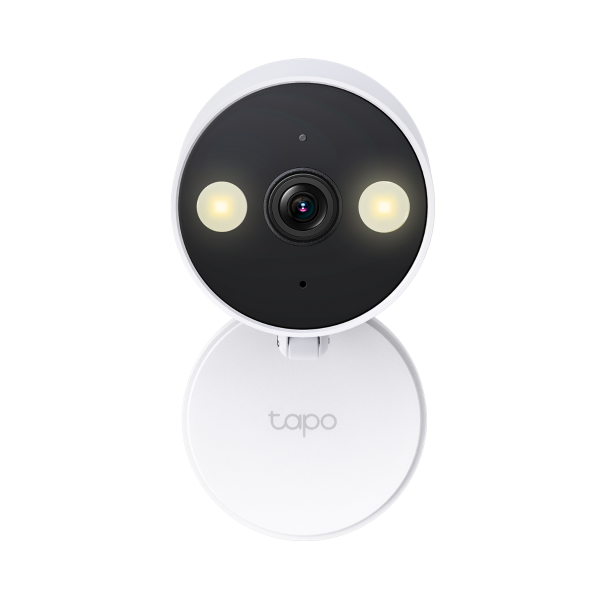
- Maximum resolution: 2K+ (2560*1440 px)
- Weather resistance: IP66
- Local storage: MicroSD card up to 512 GB
Reolink Argus 4 Pro
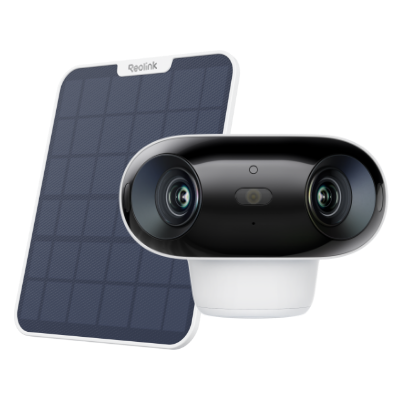
- Field of view: 180° horizontal; 50° vertical
- Resolution: 5120×1440 (8 megapixels) at 15 fps
- MicroSD capacity: Up to 512 GB
The eufy Security SoloCam S340 Solar Security Camera is our best overall pick: its dual cameras, pan-and-tilt coverage, solar panel, and built-in local storage make it a versatile choice for monitoring. I’m Elena Vasquez, and this guide compares published specifications and documented features to help match each camera to a practical use.
Start exploring this category with our best door locks for home.
How do our recommended picks compare?
| Product | Best for | Standout documented detail | Storage approach | Weather protection / standout detail |
|---|---|---|---|---|
| eufy Security SoloCam S340 Solar Security Camera | Monitoring with solar power, pan and tilt | Wide-angle 3K; telephoto 2K | Built-in 8 GB EMMC | Adjustable, removable 2.2W solar panel |
| Wyze Cam v4 | Monitoring with two-way talk and microSD support | 2.5K QHD (2560×1440) | MicroSD card up to 256GB | IP65 |
| REOLINK RLK8-800B4 4K PoE Security Camera System | Four-camera local-recording system | 8MP (3840 × 2160) | Pre-installed 2TB HDD | IP67 |
| Google Nest Cam Outdoor (battery) | Battery-powered use with cloud video storage | Person detection | Cloud storage; local storage not available | IP54 |
| Reolink Argus 4 Pro | Wide wireless coverage with microSD support | 180° horizontal; 50° vertical | MicroSD up to 512 GB | IP66 |
| TP-Link Tapo C120 | Monitoring with multiple detection types and microSD support | 2K+ (2560*1440 px) | MicroSD card up to 512 GB | IP66 |
Which security cameras options should you compare?
1. eufy Security SoloCam S340 Solar Security Camera Best Overall
This is our best overall choice for someone who wants a camera that can change its viewing direction. Its dual-camera setup pairs a wide-angle 3K view with a telephoto 2K view, while pan and tilt let the camera change its viewing direction. The adjustable, removable solar panel and built-in 8 GB storage support a setup centered on local recording and solar power. The tradeoff is that it connects to 2.4 GHz Wi-Fi only, and its listed standalone battery life is three months, so it is not a promise of uninterrupted power in every setting. Consider the mounting position and available sunlight before choosing it.
Best for Monitoring with solar power, pan and tilt, and built-in local storage.
| Camera resolution | Wide-angle: 3K; telephoto: 2K |
|---|---|
| Local storage | Built-in 8 GB EMMC |
| Solar panel | Adjustable and removable 2.2W solar panel |
Pros
- Dual-camera resolution: wide-angle 3K and telephoto 2K.
- Pan and tilt: pan 344° and tilt 10°–70°.
- Built-in 8 GB EMMC local storage.
Cons
- Wi-Fi support is 2.4 GHz only.
- Standalone battery life is listed as three months.
Buy if You want a dual-camera view and a removable solar panel for placement options.
Skip if You need a camera that supports 5 GHz Wi-Fi.
Sources: Product source
2. Wyze Cam v4

The Wyze Cam v4 suits shoppers who want a camera with documented 2.5K QHD video, two-way talk, and microSD support. Its night-vision setup includes infrared LEDs and white spotlight LEDs. It is weather resistant to IP65. The listed connectivity includes 2.4 GHz Wi-Fi and Wi-Fi 6; check that the camera’s network and installation requirements suit your setup. A microSD card can be used for local storage, up to 256GB.
Best for Monitoring with two-way talk and optional microSD recording.
| Video resolution | 2.5K QHD (2560×1440) |
|---|---|
| Weather resistance | IP65 |
| MicroSD storage capacity | Up to 256GB |
Pros
- 2.5K QHD video resolution.
- Two-way talk and a built-in siren.
- Supports microSD cards up to 256GB.
Cons
- Check the camera’s power requirements for your intended installation.
- Check that the listed Wi-Fi connectivity suits your network.
Buy if You want a camera with a spotlight and local microSD support.
Skip if You need a different format than this model offers for your space and routine.
Sources: Product source
3. REOLINK RLK8-800B4 4K PoE Security Camera System Another Option
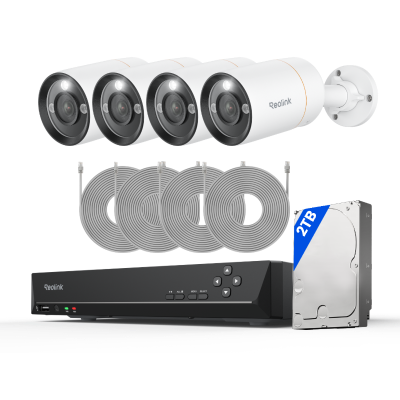
For shoppers who want several camera views managed together, this PoE kit is the most system-oriented pick in the group. It includes four B800 4K cameras and an eight-channel NVR with a pre-installed 2TB HDD. The system supports person, vehicle, and animal detection. Its PoE setup is a consideration when planning installation. Night vision is black and white, not full color. Consider the system’s storage and installation approach when comparing it with standalone cameras.
Best for Multi-camera monitoring with an NVR and included local storage.
| Included cameras and NVR | Four B800 4K PoE cameras and one 8-channel RLN8-410 NVR |
|---|---|
| Included storage | Pre-installed 2TB HDD |
| Smart detection | Person, vehicle, and animal detection |
Pros
- Includes four cameras and an eight-channel NVR.
- Pre-installed 2TB HDD for local recording.
- Supports person, vehicle, and animal detection.
Cons
- The cameras use wired PoE connections to the NVR.
- Night vision is black and white.
Buy if You want four cameras managed through one recorder.
Skip if You need a wireless camera setup or full-color night vision.
Sources: Product source
4. Google Nest Cam Outdoor (battery)
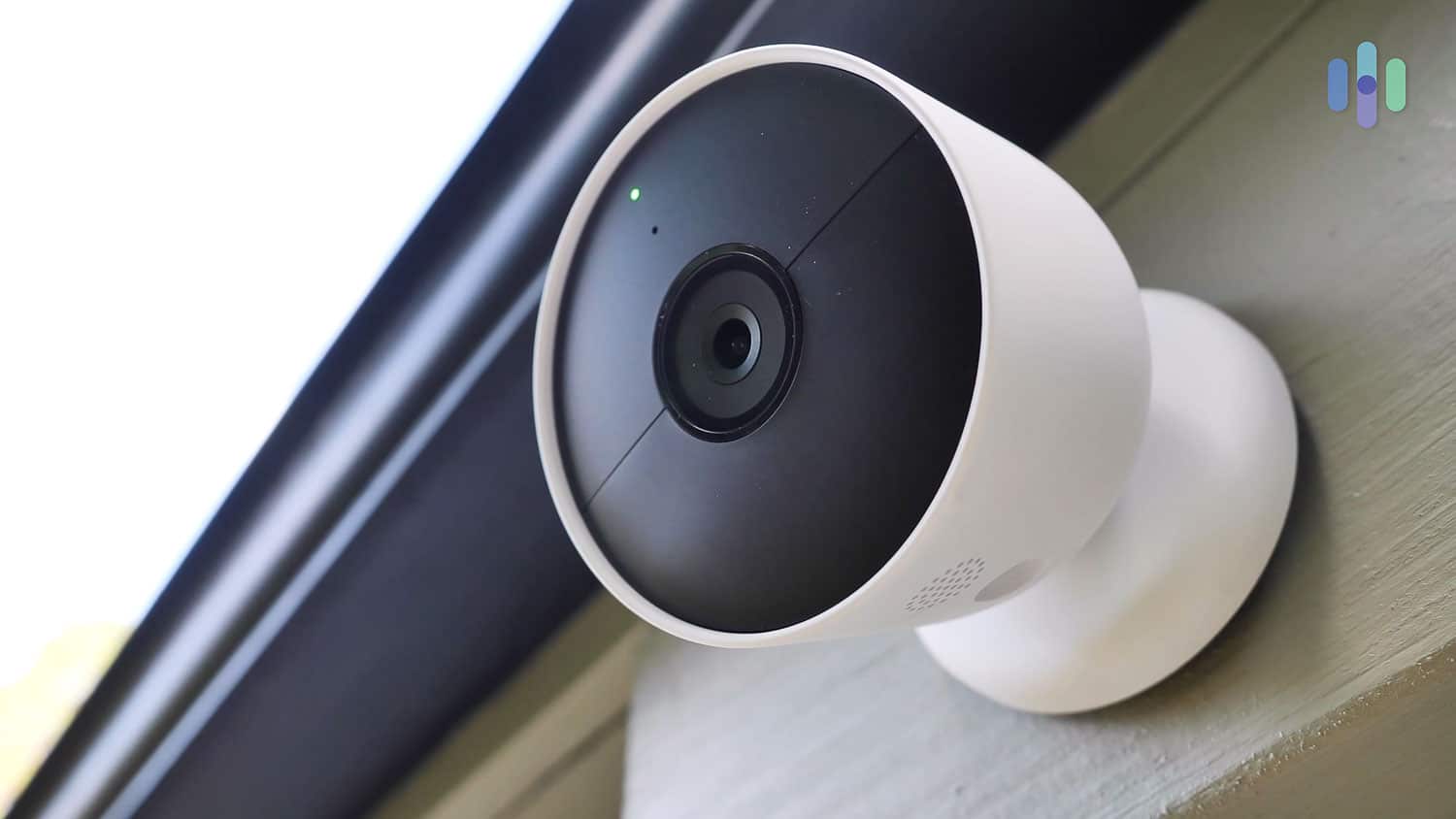
This Nest camera is a reasonable match for shoppers who want an indoor-or-outdoor battery camera. Documented features include person detection, infrared night vision, and two-way audio. It stores video in the cloud rather than locally, so weigh that storage approach against your preference before choosing it. Its IP54 weather protection is another placement consideration: the camera is described for indoor and outdoor use, but consider its rating when deciding where to install it. This pick is best when cloud recording suits your routine, not when a local-storage option is essential.
Best for Indoor or outdoor battery-camera use with cloud storage and person detection.
| Indoor and outdoor use | Usable indoors and outdoors |
|---|---|
| Weather protection | IP54 |
| Local storage | Not available |
Pros
- Usable indoors and outdoors.
- Person detection is standard on battery-powered Nest Cams.
- Supports infrared night vision and two-way audio.
Cons
- Local video storage is not available.
- Its weather protection rating is IP54.
Buy if You prefer a battery camera and are comfortable with cloud-only video storage.
Skip if You require local recording or want a higher weather-protection rating.
Sources: Product source
5. Reolink Argus 4 Pro Another Option
The Reolink Argus 4 Pro is our pick for a broad view: its documented horizontal field of view is 180°, paired with an 8-megapixel 5120×1440 image at 15 fps. It supports local microSD storage up to 512 GB. Its wireless standard is IEEE 802.11 a/b/g/n/ac/ax. Consider the field of view, storage capacity, and network requirements when deciding whether it suits your setup.
Best for A broad view with local microSD storage support.
| Field of view | 180° horizontal; 50° vertical |
|---|---|
| Resolution | 5120×1440 (8 megapixels) at 15 fps |
| MicroSD capacity | Up to 512 GB |
Pros
- 180° horizontal field of view.
- Supports microSD cards up to 512 GB.
- Supports IEEE 802.11 a/b/g/n/ac/ax.
Cons
- Check whether a microSD card is included with the configuration you choose.
- Check the recording modes available for your intended setup.
Buy if You want a wide horizontal view and local microSD storage support.
Skip if You need a bundled multi-camera recorder.
Sources: Product source
6. TP-Link Tapo C120 Alternative Pick
The TP-Link Tapo C120 is a flexible choice for someone who wants a camera with local storage and several detection options. It supports person, pet, vehicle, and baby-cry detection, and its documented night vision includes both color and infrared modes. A microSD card of up to 512 GB is supported. Its documented wireless connectivity is 2.4 GHz Wi-Fi, and it has IP66 weather resistance. Check the camera’s installation requirements and intended placement before choosing it.
Best for Monitoring with local storage and several detection types.
| Maximum resolution | 2K+ (2560*1440 px) |
|---|---|
| Weather resistance | IP66 |
| Local storage | MicroSD card up to 512 GB |
Pros
- Supports person, pet, vehicle, and baby-cry detection.
- Offers color and infrared night vision.
- Supports microSD cards up to 512 GB.
Cons
- Its documented wireless connectivity is 2.4 GHz Wi-Fi.
- Check the camera’s installation requirements when planning placement.
Buy if You want person, pet, vehicle, and baby-cry detection with microSD support.
Skip if You need a different format than this model offers for your space and routine.
Sources: Product source
How did we choose these recommendations?
- Compared published specifications for resolution, field of view, and night-vision features where documented.
- Considered documented power and installation approaches, including solar, battery, Wi-Fi, and PoE setups.
- Looked at recorded-footage options, distinguishing local storage from cloud-only storage.
- Matched documented detection and communication features to different home-monitoring needs.
We researched and compared published product specifications, documented features, and the sources linked beside each pick.
What should you look for when choosing security cameras?
Map the area before choosing a camera
Identify the specific entryway, yard, driveway, or room you want to monitor. A fixed wide field of view, a pan-and-tilt camera, and a multi-camera system solve different coverage problems. Check where the camera can be mounted and whether the desired view includes only the area you intend to monitor. A camera’s resolution does not, by itself, determine whether its field of view suits your space.
Decide how the camera will get power
A PoE system uses Power over Ethernet. The eufy SoloCam S340 has an adjustable, removable solar panel and a listed standalone battery life. The Nest is a battery camera. Consider the installation and charging requirements for each model, and check the product’s setup instructions before choosing a power approach.
Choose a recording approach
Local storage options in this group include built-in eufy storage, the Reolink NVR’s included hard drive, and microSD support on Wyze, Argus, and Tapo. Nest uses cloud storage rather than local storage. Check whether a card is included and whether your preferred recording mode is supported.
Check Wi-Fi and placement requirements
The eufy SoloCam S340 and Wyze Cam v4 list 2.4 GHz Wi-Fi; the Tapo C120 lists 2.4 GHz Wi-Fi. The Argus 4 Pro lists wireless standard IEEE 802.11 a/b/g/n/ac/ax. The Reolink PoE system includes an NVR and PoE cameras. Confirm network and installation requirements for the intended location.
Match detection and night vision to your needs
Detection options vary: the Reolink system supports person, vehicle, and animal detection, while Tapo lists person, pet, vehicle, and baby-cry detection. Night-vision styles differ too: Tapo offers color and infrared night vision, while the Reolink PoE cameras use black-and-white infrared night vision. Pick features that address the activity you want to monitor.
Which home security camera is the best overall?
The eufy Security SoloCam S340 Solar Security Camera earns the overall recommendation for shoppers who want flexibility in camera positioning. Its dual-camera design combines a wide-angle 3K lens and telephoto 2K lens, and pan and tilt let it change its view. The solar panel is adjustable and removable, and the camera includes 8 GB of local storage.
That mix is not the right fit for every setup. The camera supports 2.4 GHz Wi-Fi only, and its stated standalone battery life is three months. If you want one recorder for multiple fixed cameras, consider the REOLINK RLK8-800B4 instead. If a broad stationary view is the priority, the Reolink Argus 4 Pro has a documented 180° horizontal field of view. The best choice depends on whether you value flexible camera movement, a wired system, or a wide fixed view most.
Should you choose a wired system or a battery camera?
Start with the camera location and decide whether a cable is practical. The REOLINK RLK8-800B4 uses PoE, and its included cameras are part of a system with an NVR. Check the installation requirements when planning camera locations. The Wyze Cam v4 and TP-Link Tapo C120 have documented Wi-Fi and other features; consult their setup requirements when deciding where to install them.
Some cameras have documented battery or solar features: the eufy camera has a listed standalone battery life and an adjustable, removable solar panel, and the Nest is a battery camera. Consider the connection and maintenance implications as well as the camera itself. The Reolink PoE system includes an NVR and pre-installed 2TB HDD; compare its documented storage approach with the other options.
FAQ
Which camera in this guide is best for a complete multi-camera setup?
The REOLINK RLK8-800B4 4K PoE Security Camera System includes four cameras and an eight-channel NVR with a pre-installed 2TB HDD. Plan the installation around the included cameras and recorder.
Which cameras support local storage?
The eufy camera has built-in 8 GB storage. The Reolink PoE kit includes an NVR with a pre-installed 2TB HDD. Wyze, Reolink Argus 4 Pro, and Tapo support microSD cards. The Google Nest Cam Outdoor (battery) stores video in the cloud, with no local storage option documented.
Do any of these cameras need 5 GHz Wi-Fi?
The eufy SoloCam S340 and Wyze Cam v4 list 2.4 GHz Wi-Fi, and the Tapo C120 lists 2.4 GHz Wi-Fi. The Argus 4 Pro lists wireless standard IEEE 802.11 a/b/g/n/ac/ax. The Reolink PoE system includes an NVR and PoE cameras. Check each product’s setup requirements against your intended installation.
Which options use solar power?
The eufy SoloCam S340 includes an adjustable, removable solar panel. The supplied specifications for the other models describe different documented features and power approaches. Check the product’s installation guidance when considering charging options.
Which cameras offer color night vision?
The Tapo C120 has color and infrared night-vision modes. The Wyze Cam v4 lists infrared LEDs and white spotlight LEDs. The Reolink PoE cameras use black-and-white infrared night vision. Check each model’s setup details for how its night mode works.
Which camera is suitable for a covered outdoor location?
Several cameras are documented for indoor and outdoor use, but ratings differ. The Google Nest Cam Outdoor (battery) has an IP54 rating. Wyze is rated IP65, Tapo and Argus IP66, and the Reolink PoE cameras IP67. Follow each product’s installation guidance and consider the placement and exposure.
Which security cameras should you buy?
For most homes, start with the eufy Security SoloCam S340 Solar Security Camera. For another option, compare the TP-Link Tapo C120. Need the use-case pick? Consider the Reolink Argus 4 Pro.
- Best Overall: eufy Security SoloCam S340 Solar Security Camera
- Alternative Pick: TP-Link Tapo C120
- Another Option: Reolink Argus 4 Pro
When was this guide last updated?
- November 07, 2026: Editorial research prepared. Product specifications and source images reviewed.