


HP OfficeJet Pro 9125e Wireless All-in-One Printer
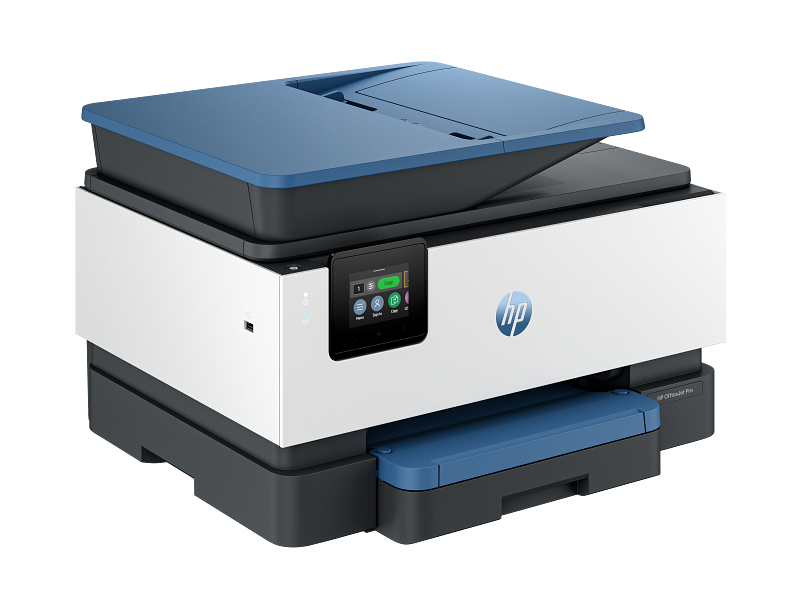
- Functions: Print, copy, scan, fax
- Standard paper input: 250-sheet input tray
- Automatic document feeder: 35 sheets
Brother HL-L2460DW Wireless Compact Monochrome Laser Printer

- Print technology: Monochrome laser
- Main paper tray capacity: 250 sheets
- Black-and-white print speed: 36 ppm
Epson EcoTank Photo ET-8550 Wireless Wide-Format All-in-One Supertank Printer
- Maximum paper size: 13 x 19 inches (A3+)
- Maximum print resolution: 5760 x 1440 dpi
- Display: 4.3-inch touch LCD
The HP OfficeJet Pro 9125e is our best overall office printer pick because it combines print, copy, scan, and fax functions with automatic duplex printing, a 250-sheet input tray, and a 35-sheet document feeder. For other needs, consider a monochrome laser printer for black-and-white work or a wide-format model for large color projects.
Start exploring this category with our best home color laser printer.
How do our recommended picks compare?
| Product | Best for | Functions or technology | Paper capacity or size | Print speed |
|---|---|---|---|---|
| HP OfficeJet Pro 9125e Wireless All-in-One Printer | Office paperwork | Print, copy, scan, fax | 250-sheet input tray | Black ISO: up to 22 ppm |
| Brother MFC-L3780CDW Digital Color All-in-One Printer | Color all-in-one with USB memory support | Print, scan, copy, fax | Not listed | 31 ppm |
| Brother HL-L2460DW Wireless Compact Monochrome Laser Printer | Black-and-white documents | Monochrome laser | 250-sheet main tray | Black-and-white: 36 ppm |
| Epson EcoTank ET-3850 Wireless Color All-in-One Supertank Printer | Color all-in-one Supertank format | All-in-One Supertank inkjet | Not listed | Not listed |
| Epson EcoTank Photo ET-8550 Wireless Wide-Format All-in-One Supertank Printer | Wide-format color projects | Wireless all-in-one | Up to 13 x 19 inches (A3+) | Black 16.0; color 12.0 ISO ppm |
| Canon PIXMA TR4720 Wireless All-in-One Printer | Letter-size all-in-one with fax | Print, copy, scan, fax | 100-sheet plain-paper capacity | Not listed |
| Canon PIXMA TS6420a Wireless All-in-One Printer | Print, copy, and scan | Printer, copier, scanner | Not listed | Color: 6.8 pages per minute |
| Brother MFC-J4335DW INKvestment Tank Color Inkjet All-in-One Printer | Color all-in-one with duplex printing | Print, copy, scan, fax | 150 sheets | Not listed |
Which office printers options should you compare?
1. HP OfficeJet Pro 9125e Wireless All-in-One Printer Best Overall
The HP OfficeJet Pro 9125e is our best overall pick for a home office that handles mixed paperwork. It prints, copies, scans, and faxes, and its automatic duplex printing can handle two-sided print jobs without manual page turning. The 250-sheet input tray and 35-sheet automatic document feeder make it a practical match for recurring document work and multi-page scanning. Built-in dual-band Wi-Fi is documented. Choose it when scanning and fax functions belong in one machine; consider the Brother HL-L2460DW if you only need monochrome printing.
Best for Office paperwork with scanning and faxing
| Functions | Print, copy, scan, fax |
|---|---|
| Standard paper input | 250-sheet input tray |
| Automatic document feeder | 35 sheets |
Pros
- Automatic duplex printing
- Built-in dual-band Wi-Fi
- 35-sheet automatic document feeder
Cons
- Not a monochrome laser printer
- Not the wide-format pick
Buy if You want print, copy, scan, fax, automatic duplex printing, and an ADF.
Skip if You need only monochrome printing or want a wide-format photo printer.
Sources: Product source
2. Brother MFC-L3780CDW Digital Color All-in-One Printer

The Brother MFC-L3780CDW is a fit for an office that wants color printing and several document functions in one machine. Its documented functions include print, scan, copy, and fax, and the listed print speed is 31 pages per minute. It also supports printing and scanning to a USB memory stick. Check its paper-tray capacity and document-feeder details before choosing if those features matter to your workflow. Pick the Brother when the combination of color, four functions, and USB memory support suits your needs.
Best for Color office work and USB memory printing or scanning
| Functions | Print, scan, copy, and fax |
|---|---|
| Print speed | 31 ppm |
| USB memory stick support | Print and scan to USB memory stick |
Pros
- Four documented functions
- USB memory stick printing and scanning
- 31 ppm listed print speed
Cons
- No tray capacity listed here
- No ADF capacity listed here
Buy if You want a color all-in-one with fax and USB memory stick support.
Skip if You need tray-capacity or document-feeder details before choosing.
Sources: Product source Additional specifications
3. Brother HL-L2460DW Wireless Compact Monochrome Laser Printer Alternative Pick
The Brother HL-L2460DW is the monochrome pick for a workspace focused on black-and-white documents. Its laser print technology and 250-sheet main paper tray are documented, as are Wi-Fi, USB type B, and LAN connections. The listed black-and-white print speed is 36 pages per minute. If you need scanning, copying, or faxing, choose a model whose listed functions include them. It also does not address color printing. For offices that mainly produce text documents and want a sizable documented main tray, its focused feature set is the point; for color work or document capture, choose one of the multifunction alternatives instead.
Best for Black-and-white office documents
| Print technology | Monochrome laser |
|---|---|
| Main paper tray capacity | 250 sheets |
| Black-and-white print speed | 36 ppm |
Pros
- Monochrome laser technology
- 250-sheet main paper tray
- Wi-Fi, USB type B, and LAN connections
Cons
- Monochrome printing
- Not the multifunction pick
Buy if You need monochrome laser printing with Wi-Fi, USB, or LAN connections.
Skip if You need color printing or a documented scanner, copier, or fax.
Sources: Product source Additional specifications
4. Epson EcoTank ET-3850 Wireless Color All-in-One Supertank Printer
The Epson EcoTank ET-3850 is a color all-in-one option for shoppers considering the EcoTank Supertank category. The product name identifies it as a wireless color all-in-one Supertank printer, and a display screen is documented. That gives shoppers a clear starting point if they want a color multifunction model with an on-printer display. Before deciding, check the printer's current print-speed, paper-capacity, and connectivity specifications against your workflow, especially if tray capacity or scanning features are essential. It is best suited to shoppers who value the named all-in-one format and display.
Best for Shoppers seeking a color all-in-one Supertank printer
| Product name | EcoTank ET-3850 All-in-One Supertank Inkjet Printer |
|---|---|
| Brand | Epson |
| Display screen | Present |
Pros
- Color all-in-one Supertank format
- Display screen documented
- Product identity is clearly specified
Cons
- Check tray capacity before choosing
- Check print speed before choosing
Buy if You want the named color all-in-one Supertank format with a display screen.
Skip if You need specific tray-capacity or print-speed figures before choosing.
Sources: Product source
5. Epson EcoTank Photo ET-8550 Wireless Wide-Format All-in-One Supertank Printer Another Option
The Epson EcoTank Photo ET-8550 is the specialist pick for wide-format color photos, graphics, and everyday documents. It supports paper up to 13 x 19 inches (A3+), and its documented print resolution is 5760 x 1440 dpi. A 4.3-inch touch LCD and Wi-Fi 5, USB, and wired Ethernet are also listed. This makes it a better fit for creative projects that need large-format support than for a shopper looking only for a straightforward monochrome document printer. Its listed ISO print speeds are 16.0 ppm for black and 12.0 ppm for color. Choose it when wide-format output and color are central requirements; consider a different pick when those capabilities are unnecessary.
Best for Wide-format color photos and creative projects
| Maximum paper size | 13 x 19 inches (A3+) |
|---|---|
| Maximum print resolution | 5760 x 1440 dpi |
| Display | 4.3-inch touch LCD |
Pros
- Wide-format support up to 13 x 19 inches
- Wireless all-in-one printing
- Wi-Fi 5, USB, and wired Ethernet
Cons
- Specialist wide-format choice
- Not the monochrome office pick
Buy if You need a documented maximum paper size of 13 x 19 inches (A3+).
Skip if You only need monochrome office documents or do not need wide-format printing.
Sources: Product source
6. Canon PIXMA TR4720 Wireless All-in-One Printer

The Canon PIXMA TR4720 is a four-function choice for a home office that wants printing plus copying, scanning, and faxing. Its documented plain-paper capacity is 100 sheets, and it prints up to 8.5 x 11 inches. Those details make it a fit for regular letter-size paperwork when you want all four functions without selecting a larger-capacity tray model. The tradeoff is the smaller documented paper capacity compared with options such as the Brother HL-L2460DW and HP OfficeJet Pro 9125e, each listed with a 250-sheet tray. It is not the pick for wide-format projects or for shoppers prioritizing a large paper reserve. Choose it when the four-in-one function set is the central requirement.
Best for Letter-size home-office tasks with fax
| Functions | Print, copy, scan, and fax |
|---|---|
| Maximum print size | 8.5 x 11 inches |
| Plain paper capacity | 100 sheets |
Pros
- Four documented functions
- Letter-size printing documented
- 100-sheet plain-paper capacity
Cons
- Smaller documented capacity than 250-sheet options
- Not the wide-format pick
Buy if You want print, copy, scan, and fax in a single printer.
Skip if You need a documented paper capacity above 100 sheets or wide-format output.
Sources: Product source
7. Canon PIXMA TS6420a Wireless All-in-One Printer

The Canon PIXMA TS6420a is a simple all-in-one option for shoppers who want printing, copying, and scanning. Its documented ISO color print speed is 6.8 pages per minute, and the listed product height is 5.9 inches. Those are useful comparison points for someone considering this model for a home workspace where color output and an all-in-one format matter. Fax is not among its listed functions; check its paper-tray capacity and print size if those details are deciding factors. Consider the Canon PIXMA TR4720 if fax and a 100-sheet capacity matter, or the HP OfficeJet Pro 9125e if an ADF and 250-sheet input tray are priorities.
Best for Basic print, copy, and scan needs
| Functions | Printer, copier, scanner |
|---|---|
| ISO color print speed | 6.8 pages per minute |
| Product height | 5.9 inches |
Pros
- Print, copy, and scan functions
- ISO color speed documented
- Product height documented
Cons
- No fax function listed here
- Check tray capacity before choosing
Buy if You want an all-in-one with a documented color print-speed figure.
Skip if You need fax or want to confirm tray capacity and print size before choosing.
Sources: Product source
8. Brother MFC-J4335DW INKvestment Tank Color Inkjet All-in-One Printer
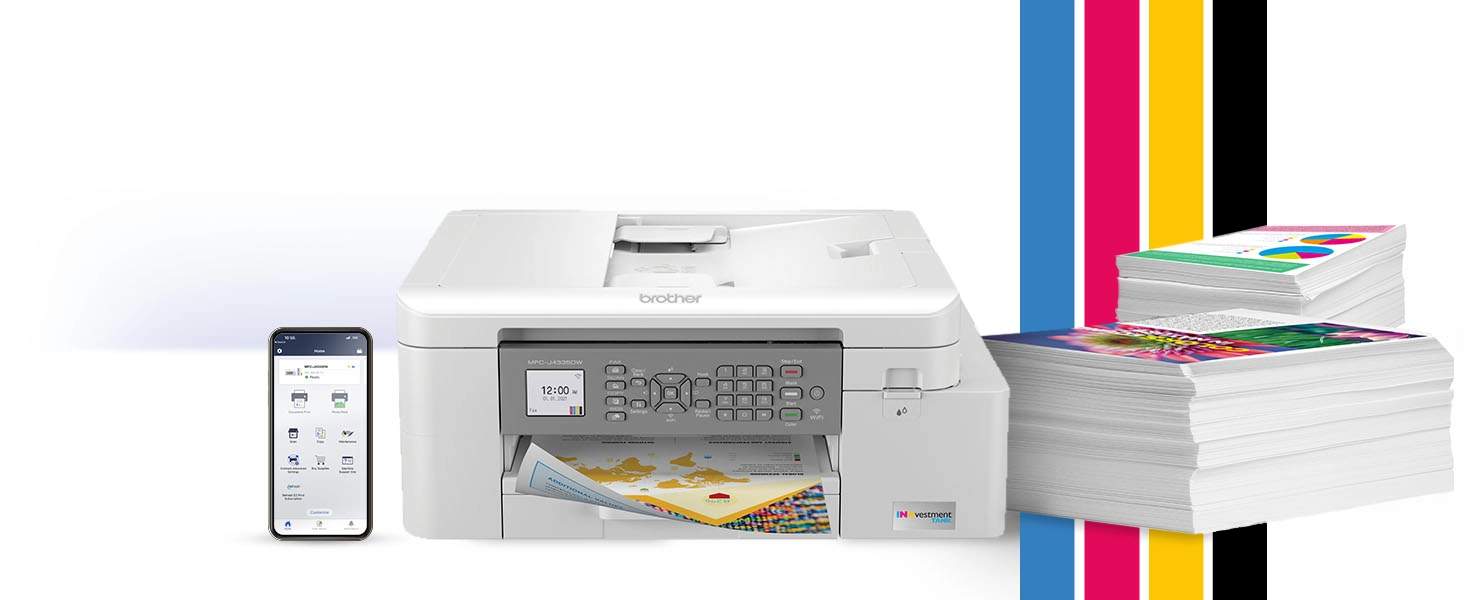
The Brother MFC-J4335DW is a fit here for a color inkjet all-in-one with documented automatic duplex printing and a 150-sheet standard paper capacity. It handles print, copy, scan, and fax tasks, and its listed connectivity includes wireless, Wi-Fi Direct, and Hi-Speed USB 2.0. The 1.8-inch color display is another documented feature. This is an option for a home office that wants several functions and common connection choices in one machine. Choose it if its documented connectivity and paper handling fit your routine.
Best for Color all-in-one tasks with automatic duplex printing
| Functions | Print, copy, scan, and fax |
|---|---|
| Standard paper capacity | 150 sheets |
| Automatic duplex printing | Yes |
Pros
- Four documented functions
- Wireless, Wi-Fi Direct, and USB connectivity
- Automatic duplex printing
Cons
- Check ADF capacity if it matters to your workflow
- Smaller standard paper capacity than 250-sheet options
Buy if You want four functions, automatic duplex printing, and multiple connection options.
Skip if You need to confirm the ADF capacity before choosing.
Sources: Product source
How did we choose these recommendations?
- Compared published specifications and documented features for print, copy, scan, and fax needs.
- Considered paper handling, including documented tray capacity and automatic document feeders.
- Looked at documented print technologies, connectivity, and special media or format support.
- Matched each recommendation to a defined office use rather than claiming an unmeasured overall winner.
We researched and compared published product specifications, documented features, and the sources linked beside each pick.
What should you look for when choosing office printers?
List the functions you actually need
Decide whether your workflow needs only printing or also copying, scanning, and faxing. Several listed models document all four functions, while the Canon PIXMA TS6420a lists printing, copying, and scanning. The Brother HL-L2460DW is the monochrome laser choice in this group. Choosing by task avoids paying attention to features that do not serve your office.
Match paper handling to your routine
Compare the paper tray and automatic document feeder as separate features. The HP OfficeJet Pro 9125e lists a 250-sheet tray and a 35-sheet ADF; the Brother MFC-J4335DW lists a 150-sheet standard paper capacity. If ADF capacity matters, check that specification for the Brother before buying. The Canon PIXMA TR4720 lists a 100-sheet plain-paper capacity. Use the figures that matter to your workload.
Choose the right output format
For monochrome documents, consider the Brother HL-L2460DW. For color all-in-one work, compare the Brother, Canon, and HP choices. For large creative projects, the Epson ET-8550 documents support up to 13 x 19 inches (A3+). Avoid treating a specialist format as a must-have if your work does not need it.
Check connection options
Connection details vary by model. The Brother HL-L2460DW lists Wi-Fi, USB type B, and LAN. The Brother MFC-J4335DW lists wireless, Wi-Fi Direct, and Hi-Speed USB 2.0. The Epson ET-8550 lists Wi-Fi 5, USB, and wired Ethernet. Confirm the connections you plan to use before choosing.
Compare only relevant specifications
Print speed, resolution, tray capacity, and maximum paper size describe different things. Use the speed figures for the specific print mode stated, and do not assume speeds from different methods are directly comparable. If a specification matters to your purchase, verify that exact item for the model rather than relying on its category or product name.
Which office printer is the best overall choice?
For a mixed home-office workload, the HP OfficeJet Pro 9125e brings together printing, copying, scanning, and faxing. Automatic duplex printing is documented, as are a 250-sheet input tray and a 35-sheet automatic document feeder. Those features make it a strong fit for routine paperwork and multi-page document handling.
The Brother MFC-L3780CDW is another color all-in-one choice and lists a 31 ppm print speed plus USB memory stick printing and scanning. The Brother MFC-J4335DW offers automatic duplex printing and wireless, Wi-Fi Direct, and USB connections. If you do not need color or scanning, the monochrome Brother HL-L2460DW is a more focused option. The right pick depends on which documented functions match your daily work.
Should you choose a laser or inkjet office printer?
Start with the work you need the printer to do. The Brother HL-L2460DW is documented as a monochrome laser printer, with a 250-sheet main tray and a listed black-and-white speed of 36 ppm. It is the clearest fit in this group when your work is black-and-white documents.
The color all-in-one options serve a different purpose. The Brother MFC-L3780CDW documents color printing and print, scan, copy, and fax functions. The Epson EcoTank Photo ET-8550 is a wide-format color choice for photos, graphics, and everyday documents. Running costs and real-world performance are separate considerations; compare them if they matter to your decision. Match the technology and functions to your document mix, and check specific paper and connectivity needs before deciding.
FAQ
Which office printer in this guide has the largest documented paper tray?
The HP OfficeJet Pro 9125e and Brother HL-L2460DW each list a 250-sheet input or main paper tray. They serve different needs: HP is an all-in-one with fax, while Brother is a monochrome laser printer.
Which recommendations include fax?
The HP OfficeJet Pro 9125e, Brother MFC-L3780CDW, Brother MFC-J4335DW, and Canon PIXMA TR4720 document fax alongside printing, copying, and scanning. Check the individual specifications if fax is a required part of your workflow.
Which printer supports the largest paper size?
The Epson EcoTank Photo ET-8550 lists a maximum paper size of 13 x 19 inches (A3+). It is the wide-format recommendation for shoppers whose photo, graphic, or document projects need that size.
Which printer is specifically monochrome laser?
The Brother HL-L2460DW is documented as a monochrome laser printer. Its listed black-and-white print speed is 36 ppm, and its main paper tray capacity is 250 sheets.
Do the Brother MFC-J4335DW and HP OfficeJet Pro 9125e print on both sides automatically?
Yes. Automatic duplex printing is documented for both models. The Brother also lists a 150-sheet standard paper capacity, while the HP lists a 250-sheet input tray.
How should I choose between the Canon PIXMA TR4720 and TS6420a?
The TR4720 documents print, copy, scan, and fax functions plus a 100-sheet plain-paper capacity. The TS6420a documents print, copy, and scan functions and a 6.8-pages-per-minute ISO color speed. Choose based on the features your routine requires.
Which office printers should you buy?
For most homes, start with the HP OfficeJet Pro 9125e Wireless All-in-One Printer. For another option, compare the Brother HL-L2460DW Wireless Compact Monochrome Laser Printer. Need the use-case pick? Consider the Epson EcoTank Photo ET-8550 Wireless Wide-Format All-in-One Supertank Printer.
- Best Overall: HP OfficeJet Pro 9125e Wireless All-in-One Printer
- Alternative Pick: Brother HL-L2460DW Wireless Compact Monochrome Laser Printer
- Another Option: Epson EcoTank Photo ET-8550 Wireless Wide-Format All-in-One Supertank Printer
When was this guide last updated?
- November 07, 2026: Editorial research prepared. Product specifications and source images reviewed.